HEIC vs JPEG: Which Photo Format is Better?
Quick Answer
HEIC is better than JPEG - it creates files 50% smaller while maintaining equal or better quality. However, JPEG works everywhere while HEIC mainly works on Apple devices. Convert HEIC to JPEG when sharing photos with non-Apple users.
HEIC vs JPEG: Key Differences
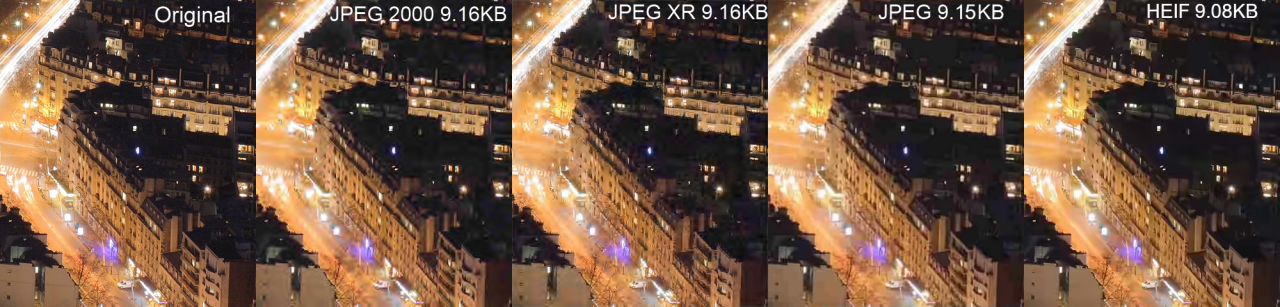
File size comparison: HEIC vs JPEG and other formats
Should you keep your iPhone photos as HEIC or convert them to JPEG? This guide compares both formats to help you decide. If you've already decided to convert, check out our free HEIC converter.
Quick Comparison
| Feature | HEIC | JPEG |
|---|---|---|
| File Size | 50% smaller | Larger |
| Compression | HEVC (modern) | DCT (1992) |
| Quality at Same Size | Better | Good |
| Color Depth | 16-bit | 8-bit |
| Transparency | Yes | No |
| Compatibility | Limited | Universal |
| Web Support | Limited | All browsers |
| Email Friendly | Often fails | Always works |
Why is HEIC Better Than JPEG?
HEIC (High Efficiency Image Container) uses HEVC compression, the same technology used for 4K video. This modern compression is far more efficient than JPEG's 30-year-old algorithm:
- 50% smaller files at the same visual quality
- 16-bit color vs JPEG's 8-bit (65,536x more colors)
- Better gradients - no banding in skies or skin tones
- Supports transparency - JPEG cannot
- Stores multiple images - perfect for Live Photos and bursts
- Non-destructive edits - preserves original data
Real Example: A 12MP iPhone photo is typically 1.5MB in HEIC vs 3MB in JPEG - half the size with no visible quality loss. That means you can store 2x more photos on your iPhone!
Why Convert HEIC to JPEG?
Despite HEIC's advantages, there are many reasons to convert to JPEG:
- Sharing with Windows/Android users - JPEG works everywhere
- Uploading to websites - Many sites don't accept HEIC
- Sending via email - JPEG is universally supported
- Social media - Some platforms don't handle HEIC well
- Printing services - Most require JPEG or PNG
- Older software - Photoshop before CC 2020 needs JPEG
HEIC: Pros and Cons
Pros
- 50% smaller file sizes
- Better image quality
- 16-bit color depth
- Supports transparency
- Stores Live Photos
- Non-destructive editing
Cons
- Limited compatibility
- Windows needs codec
- Many websites reject it
- Email issues common
- Android doesn't support it
- Older apps can't open it
JPEG: Pros and Cons
Pros
- Universal compatibility
- Works on every device
- All websites accept it
- Email-friendly
- 30+ years of support
- No conversion needed
Cons
- Larger file sizes
- 8-bit color only
- No transparency
- Quality degrades with edits
- Outdated compression
- Visible artifacts at low quality
When to Use Each Format
Keep HEIC When:
- Storing photos on your iPhone/iPad
- You want to maximize storage space
- Sharing only with other Apple users
- You have AirDrop available
- Keeping photos in iCloud
Convert to JPEG When:
- Sharing with Windows or Android users
- Uploading to websites or social media
- Sending photos via email
- Using older editing software
- Printing photos
- Maximum compatibility is needed
File Size Comparison
Here's a real-world test with the same 12MP iPhone photo:
| Format | File Size | Quality |
|---|---|---|
| HEIC (original) | 1.5 MB | Excellent |
| JPEG 100% | 4.2 MB | Excellent |
| JPEG 90% | 2.8 MB | Very Good |
| JPEG 80% | 1.9 MB | Good |
| WebP | 1.8 MB | Excellent |
Pro Tip: When converting HEIC to JPEG, use 90% quality for the best balance of file size and quality. At this setting, there's no visible difference from the original. For even smaller files with great quality, try converting to WebP using our converter.
How to Convert HEIC to JPEG
The easiest way to convert HEIC to JPEG is using our free online converter:
- Go to HoneyConvert.com
- Drag and drop your HEIC files
- Select JPEG as the output format
- Click Convert and download
No software needed, works on any device, and you can batch convert multiple files at once.
Convert HEIC to JPEG Free
Instant conversion, no software needed. Works on any device.
Convert Now - It's FreeFrequently Asked Questions
Is HEIC better than JPEG?
Yes, HEIC is technically superior. It produces files 50% smaller while maintaining equal or better quality. It also supports 16-bit color, transparency, and multiple images. The only downside is limited compatibility outside Apple devices.
What is the difference between HEIC and JPEG?
The main differences are: 1) File size - HEIC is 50% smaller at the same quality, 2) Compression - HEIC uses modern HEVC vs JPEG's 1992 algorithm, 3) Color - HEIC supports 16-bit vs JPEG's 8-bit, 4) Compatibility - JPEG works everywhere while HEIC mainly works on Apple devices.
Does converting HEIC to JPEG lose quality?
It depends on the quality setting. At 90-100% JPEG quality, the difference is imperceptible. At lower settings, you may notice compression artifacts. For best results, use a high-quality converter and set JPEG quality to 90% or higher.
Why does iPhone use HEIC instead of JPEG?
Apple switched to HEIC in iOS 11 (2017) because it saves 50% storage space compared to JPEG while maintaining the same visual quality. This means you can store twice as many photos on your iPhone. HEIC also supports advanced features like Live Photos and HDR.
Should I change my iPhone from HEIC to JPEG?
Only if you frequently share photos with non-Apple users. To change: Settings > Camera > Formats > Most Compatible. Note that this uses 2x more storage. A better option is to keep HEIC and convert to JPEG only when sharing.
Can Windows open HEIC files?
Windows 10/11 can open HEIC after installing the free HEIF Image Extensions from Microsoft Store. Alternatively, use our online converter to convert HEIC to JPEG without installing anything. See our full guide on fixing HEIC not opening on Windows.
Is JPEG or HEIC better for email?
JPEG is better for email. Many email clients and recipients can't view HEIC attachments. Convert HEIC to JPEG before emailing photos to ensure everyone can open them.
Which has better quality, HEIC or JPEG?
HEIC has better quality at the same file size. It supports 16-bit color depth (over 65,000x more colors than JPEG's 8-bit), resulting in smoother gradients and more accurate colors. At the same file size, HEIC will always look better than JPEG.